For Windows 10 & 11 · Chrome, Edge, Brave, Firefox

Downloads that use your whole connection

Tessera DM splits every file into parallel pieces and downloads them at once — with crash-safe resume, a browser button on every video, and a full torrent client built in. One app for everything you download.

Lifetime license or 1 year · No subscription · Up to 5 PCs · No ads, no bundled software

See it in action

A real, unedited recording: five downloads and a Linux torrent at the same time, each split over many connections.

Everything a download manager should do

Built natively for Windows with a modern Fluent interface.

Parallel connections

Files are split into up to 32 pieces that download at the same time. Idle connections take over the slowest piece so nothing waits.

Pause & resume

Stop any time, close the app, lose Wi-Fi, even if the PC crashes — downloads continue from exactly where they left off. Stuck connections are detected and restarted automatically.

Browser integration

Downloads from Chrome, Edge, Brave and Firefox are caught automatically, cookies and all, so logged-in downloads just work.

“Download this video” button

Hover any video to grab it, or pick from the “Media on this page” list. Every quality is shown with its resolution, and files get a clean name from the page title — no more “video.mp4”.

See every connection

A live segment map shows each connection and its piece of the file, with a speed graph and per-connection progress.

Torrents built in

A full torrent client in the same app. Magnet links and .torrent files open straight in Tessera — pick the files you want, watch peers and pieces, set a seeding goal. Resumes after a restart.

Lives in your tray

Close the window and Tessera keeps downloading in the background, starts with Windows, and notifies you when files are ready.

Smart pop-upsNew

Click a link and a “Download file info” window shows the name, size and folder — the download already starts behind it. When it's done: Open, Open with, or Open folder in one click.

A beautiful libraryNew

Downloads and torrents side by side, sorted into categories, with file-type icons, video thumbnails and real previews. Modern Windows 11 design in dark or light theme.

Every video, in the quality you want

Hover a video and click Download this video. Tessera lists every quality the site offers, with its size, before you download.

  • From 144p up to 1080p and 4K, or audio only (M4A)
  • Video and audio downloaded in parallel and joined into one MP4
  • With Plus: YouTube and 1,000+ video sites
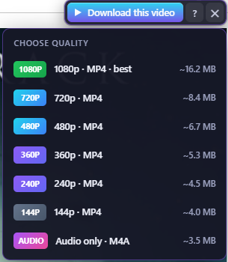
Tessera DM's “Download this video” button with its quality menu: 1080p, 720p, 480p, 360p, 240p, 144p and audio only, each with its file size

…and much more

  • Speed limit
  • Download queue with reorder & schedule
  • Automatic retries
  • Dynamic piece splitting
  • Streaming (HLS) videos, incl. encrypted
  • Video + audio joined into MP4
  • Right-click “Download with Tessera”
  • Choose which file types to catch
  • Drag & drop links and .torrent files
  • Opens magnet links & .torrent files
  • Faster peer finding for magnet links
  • Torrent download in order (stream while downloading)
  • VPN-only kill switch
  • Torrent schedule
  • Up/down speed limits for torrents
  • Detailed piece map
  • Install the browser extension from the app
  • Start minimized with Windows

Install the browser extension

The extension sends your downloads and videos from the browser to Tessera DM. It comes with the app — no separate download.

Temporary: the extension is waiting for approval in the Chrome Web Store, Microsoft Edge Add-ons and Firefox Add-ons. Until then, install it with the few steps below (“Developer mode”). When it is approved, the app's Install button will add it in one click, and you won't need these steps any more.

Chrome, Edge, Brave, Opera, Vivaldi

  1. Open Tessera DM → Browser extension and click Install on your browser's card (it copies the folder path), or click Extension folder.
  2. In the browser, open the extensions page: chrome://extensions (Edge: edge://extensions, Brave: brave://extensions).
  3. Turn on Developer mode (top right; in Edge it is on the left).
  4. Click Load unpacked and choose the extension folder (you can paste the copied path into the address bar of the folder window).
  5. Pin the Tessera DM icon next to the address bar. Its popup should say Connected.

The browser may show a note about developer-mode extensions when it starts. That is normal for extensions installed this way — keep it on.

Firefox

  1. Open Tessera DM → Browser extension → Extension folder.
  2. In Firefox, open about:debugging#/runtime/this-firefox.
  3. Click Load Temporary Add-on… and choose manifest.json in the extension folder.
  4. Open about:addons → Tessera DM → Permissions, and allow it to access all websites.

Firefox removes temporary add-ons when it closes, so repeat these steps after restarting Firefox until the Firefox Add-ons version is approved.

One app instead of two

Most people use one program for downloads and another for torrents. Tessera DM does both — and you pay once.

Tessera DMClassic download managersTorrent apps
Multi-connection downloads✓ up to 32✓—
Browser capture & video button✓✓—
Torrents & magnet links✓ built inUsually not✓
Crash-safe resume✓Varies✓
Modern Windows 11 design, dark & light✓Often datedVaries
Pay once (lifetime), no subscription✓Varies—
No ads, no bundled offers✓VariesVaries

General comparison of common tools in each group; individual products differ.

Safe & private

Your downloads are your business. Tessera DM runs on your PC and keeps it that way.

No ads

Not in the app, not in the installer. Never.

Nothing bundled

The setup installs Tessera DM and nothing else. No toolbars, no “offers”.

No tracking

No analytics, no account. Your download list never leaves your PC.

Extension stays local

The browser extension talks only to the app on your own computer — never to our servers.

Tessera DM Plus

Every feature, for one PC or the whole family. Choose a year or keep it for life. Launch prices.

1 year

Every feature for a year at the lowest price.

$5for 1 year
Launch price
1 PC
  • All Plus features
  • Use it on 1 PC
  • All updates during the year
  • No automatic renewal
Buy 1 year

Every plan includes

  • Up to 32 connections per download
  • Full torrent client
  • YouTube & 1,000+ video sites
  • Every quality up to 4K, or audio only
  • Streaming (HLS) videos as MP4
  • Queue reorder & download schedule
  • Torrent piece map, download in order, VPN kill switch
  • Browser extension for Chrome, Edge, Firefox & more

Compared with IDM

Internet Download Manager is the best-known download manager. Here is how the prices compare.

Tessera DM PlusIDM
1 year$5 for 1 PC
$14.99 for 3 PCs (~$5 per PC)
$11.95 per PC
Lifetime$11.66 for 1 PC
$34.99 for 3 PCs (~$11.66 per PC)
$49.99 for 5 PCs (~$10 per PC)
$24.95 per PC
Torrents built in✓—
Free updates with a lifetime licenseAll 1.x versionsMay be limited to 3 years

IDM prices are the 1-PC prices on internetdownloadmanager.com in October 2026 (US dollars); IDM gives a discount when you buy for 2 or more PCs, and prices vary by country. IDM update terms from its terms and conditions. IDM is a trademark of Tonec Inc.; Tessera DM is not affiliated with it.

Questions

Anything else? Get in touch and we'll help.

Is it a subscription?

No. The lifetime license is a single payment: you keep Tessera DM Plus forever, with free updates for all 1.x versions. The 1-year license is also a single payment and does not renew automatically — when the year ends, you can buy a new year or a lifetime license.

How do I activate Plus?

After purchase you receive an email with the download link and your license key. Install Tessera DM: the first time it opens, it asks for the key — paste it and click Activate. You can also do it later in Settings → General → License. To move the license to another PC, click “Deactivate this PC” there first.

How many PCs can I use it on?

One PC with the One person plans, up to 3 PCs with the Family 1-year and lifetime licenses, or up to 5 PCs with the lifetime 5-PC license — for example your desktop, laptop and your family's computers. To move a license to a new PC, click “Deactivate this PC” on the old one first.

Will it make my downloads faster?

When a server limits the speed of each connection — which many file hosts and video sites do — splitting the file across parallel connections can be several times faster. If your internet line is already the bottleneck, no download manager can go beyond it, but you still get resume, capture and scheduling.

Can I download any video?

Tessera works with normal video files and streams. It does not download DRM-protected content (Netflix, Disney+, Spotify and similar). With Plus, please only download videos you own or have permission to save — you are responsible for following each site's terms.

Does it download torrents too?

Yes — Tessera DM has a full torrent client built in. Click a magnet link in your browser or open a .torrent file, choose the files you want, and it downloads next to your other files. Please only share and download content you have the right to.

Windows says “Windows protected your PC”. Is it safe?

Yes. Windows shows this for new apps from small developers that don't have an expensive signing certificate yet. Click “More info”, then “Run anyway”. You can check the setup yourself with the virus scan report linked above.

What data does Tessera DM collect?

None. There are no ads, no analytics and no account. The browser extension sends links only to the app on your own PC. Only when you activate your license key does the app contact our payment provider to check the key. See the privacy policy.

Which systems are supported?

Windows 10 (1809 or later) and Windows 11, 64-bit. The browser extension works with Chrome, Edge, Brave, Opera, Vivaldi and Firefox.

Get Tessera DM

Choose a plan. Right after your purchase you receive an email with the download link for the Windows setup and your license key. Install the app and paste the key when it asks — that's it.

Choose your plan

Windows 10 & 11 (64-bit) · about 50 MB · secure checkout by Lemon Squeezy